
July 20, 2026
Airbnb Welcome Book: What to Include (Section by Section)
By Shaun Ghavami
.avif)
An Airbnb welcome book is a single guide, digital or printed, that tells your guest everything they need to run your place without messaging you: the WiFi name and password, how to check in and out, a short recap of the house rules, how the appliances work, where the trash and recycling go, parking, your best local picks, emergency info, and how to reach you. Also called a house manual or guest guidebook, its whole job is to answer the questions guests ask most, before they have to ask. A good one cuts your message volume and lifts your reviews at the same time.
I have hosted more than three thousand guests since I started with a $65-a-night spare bedroom, and I co-host homes for owners across a Vancouver portfolio. Every one of those listings has a welcome book, because the math is simple: a question you answer once in writing is a question you never answer again at 11 p.m. Here is exactly what to put in yours, where to host it, and why it shows up in your review scores.
What an Airbnb welcome book actually is
People use three names for roughly the same thing, so let me sort them out. A welcome book or house manual is the operating guide for your specific property: how the place works and what a guest needs to know once they are inside. Airbnb has a built-in version of this called the house manual, which you fill out in the listing editor under Arrival guide, and only guests with a confirmed reservation can see it. You can read how it works in Airbnb's house manual help article.
A guidebook is the separate feature for local recommendations, your favorite restaurants, coffee, parks, and things to do. It is public and can be shared or printed, and it is worth filling out too. See Airbnb's guidebook help article for that one. Most hosts fold the guidebook content into their welcome book so guests have one place to look.
One thing a welcome book is not: your house rules. Rules are what a guest may not do (no parties, no smoking, quiet hours). The welcome book is how to use the place. Keep a short recap of the rules in the book for convenience, but write and enforce the real ones the way I lay out in my guide to Airbnb house rules.
What to put in an Airbnb welcome book, section by section
Here is the full section list I use, in the order a guest actually needs it: arrival, daily use, then departure and emergencies. Fill every row for your property.
SectionWhat to includeWiFiNetwork name and password, typed exactly, case-sensitive. Put this first. It is the number-one thing every guest looks for.Check-in and check-outDoor code or lock steps, arrival time, checkout time, and a short list of what to do before leaving (start the dishwasher, bag the trash, lock up).House rules recapA three or four line reminder: occupancy, quiet hours, no parties, smoking and pet policy. The full version lives in your listing.Appliance how-tosPlain steps for the things that confuse people: thermostat, oven or stove, washer and dryer, coffee maker, TV and streaming, dishwasher.Trash and recyclingWhich bin is which, where the bins live, and what day they go out if the stay overlaps collection.ParkingWhere to park, any permit or spot number, and what to avoid so the car does not get ticketed or towed.Local recommendationsFive to ten nearby picks: coffee, groceries, a good dinner, a walk. This is the part guests quote back to you in reviews.Emergency infoNearest hospital and urgent care, fire extinguisher and first-aid location, water shut-off and breaker panel, and the local emergency number.Host contactHow to reach you, the best method, and a realistic response window. Point guests to Airbnb messaging first so everything stays on-platform.
A few of these carry more weight than the rest. The appliance section prevents the most support messages, so write it like you are explaining to someone who has never seen your machines. If you are still choosing what goes in the unit, my notes on the best Airbnb amenities and on how to furnish an Airbnb pair well here: simpler appliances mean shorter how-tos and fewer confused guests.
The trash section is another quiet win. Missed collection days and wrong bins create work for your cleaner and complaints from neighbors, so spell it out. It ties into your turnover routine, which I break down in how to clean an Airbnb.
Want the whole hosting system, not just the welcome book?
I put my full playbook for building Airbnb income into a free session.
and set your operations up the way the top hosts run them.
Digital or printed: use both
You do not have to choose. A digital welcome book is always with the guest and easy to update, and Airbnb's built-in house manual is delivered inside the app the moment a reservation is confirmed. A printed copy on the kitchen counter is the backup for the guest whose phone is dead or who simply likes paper. I keep one short laminated card by the door with the WiFi and checkout basics, and the full book both in the app and in a small binder inside. Digital wins on updates: change a password once and every future guest sees it. Print wins the moment a tired guest just wants the code.
A good welcome book is really just documentation doing your job for you, an idea I extend across the whole operation in Airbnb automation done properly.
Where to host your welcome book
You have three practical options, and the best setup uses more than one.
Airbnb's built-in house manual and guidebook
Fill these out first. They are free, they live where guests already look, and the house manual is private to confirmed guests. The downside is formatting is limited and photos are not always easy, so it works best for text: WiFi, codes, rules recap, appliance basics, contact.
A simple PDF or one-page webpage
For anything richer (photos of which remote does what, a labeled parking map, longer local lists), a clean PDF or a single web page is better. Host it on a link you control, format it properly, and print the same file. Some hosts add a QR code on the counter that opens the page. Keep the link stable so it does not break between guests.
Deliver the link automatically
However you build it, the guest has to actually receive it. I send the welcome-book link in the booking confirmation and again the day before arrival, so it lands twice without me typing anything. The clean way to do that every time is with Airbnb message automation, which fires the link at booking and again pre-arrival. That single step turns a nice document into fewer questions.
How a welcome book saves time and lifts reviews
The time savings are obvious once you run it. Most guest messages are the same handful of questions: WiFi, checkout time, parking, how to work the TV. Answer them once and your inbox goes quiet. Across a portfolio that is hours back every week, part of running the business well, as I cover in how to run an Airbnb business.
Small touches like a well made welcome book compound into the recognition explained in what Guest Favorites means.
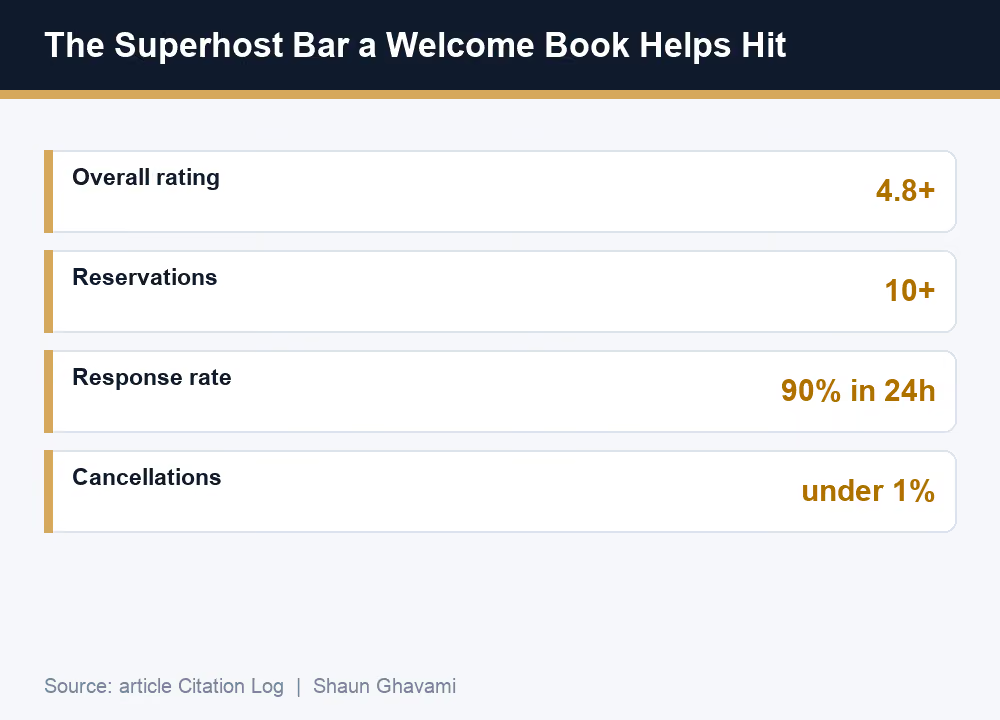
The review lift is the part hosts underrate. A guest who finds the code, the WiFi, and the coffee maker without friction has a smoother stay, and smooth stays become five-star reviews. Those reviews are the currency behind Superhost. To hit Superhost, Airbnb assesses you every three months over the trailing year and looks for a 4.8 or higher overall rating, at least 10 completed reservations (or 3 reservations totaling at least 100 nights), a 90% response rate to new messages within 24 hours, and a cancellation rate under 1%. The full criteria are in Airbnb's Superhost help article. A good welcome book pushes on the rating and, because guests ask fewer questions, makes the 90% response rate easier to hold.
Common welcome-book mistakes
The books that fail all fail the same ways. They are too long, so nobody reads them. The WiFi is buried on page four instead of at the top. The information is out of date, which is worse than none, because a wrong code destroys trust on arrival. There is no clear way to reach the host. Or the whole thing reads like a list of warnings instead of a helpful guide.
Write it the way you would brief a friend house-sitting: warm, short, in order, and current. Put the three things guests want most (WiFi, check-in, checkout) where they see them in two seconds, and review the book after any change to the property.
Build the business, not just the binder.
If you want the step-by-step for hosting more units without owning them,
and copy the system I use across my portfolio.
A quick welcome-book starter you can copy
If you want to ship a first version today, work straight down the table above: WiFi, check-in and checkout, a four-line rules recap, appliance how-tos, trash and recycling, parking, a few local picks, emergency info, and your contact. That covers most of what guests need on a normal stay.
The welcome book is one piece of a bigger operation. If you are setting up your first listing, walk through my how to start an Airbnb business guide for the full launch. Get the welcome book right and every stay gets a little easier.
A welcome book you can point to also helps with getting that first booking, since it shows a prospective guest exactly what kind of stay to expect.
Frequently asked questions
What is an Airbnb welcome book?An Airbnb welcome book, also called a house manual, is a single guide that tells your guest how to use your place: WiFi, check-in and check-out, a house rules recap, appliance how-tos, trash and recycling, parking, local recommendations, emergency info, and how to reach you. It can be digital, printed, or both. Its job is to answer the questions guests ask most, before they ask them.
What should be in an Airbnb welcome book?Cover, in order: WiFi name and password, check-in and check-out steps, a short house rules recap, how the appliances work, trash and recycling, parking, five to ten local recommendations, emergency info, and your contact details. Put the WiFi and checkout time at the very top, since those are the two things guests look for first.
Do I need a printed welcome book or is digital enough?Use both. A digital version, including Airbnb's built-in house manual, is always with the guest and easy to update when a password or detail changes. A printed copy on the counter is the backup for a dead phone or weak signal. Doing both takes about an hour and covers every situation.
Where do I put my welcome book on Airbnb?Airbnb has a built-in house manual you fill out in the listing editor under Arrival guide, which only confirmed guests can see, plus a separate guidebook for local recommendations. For richer formatting with photos and maps, host a simple PDF or one-page website and send the link. Deliver whichever version through your automated messages at booking and before arrival.
Does a welcome book improve my reviews?Yes, indirectly and reliably. When a guest finds the code, the WiFi, and the appliances without friction, the stay is smoother and the rating is higher. Those ratings feed Superhost, which needs a 4.8 or higher overall rating and a 90% response rate, and a good welcome book helps on both by removing questions before they are asked.
Is a welcome book the same as house rules?No. House rules are what a guest may not do, like no parties, no smoking, and quiet hours, and Airbnb shows them before booking. The welcome book is how to use the place. Keep a short rules recap inside the book for convenience, but write and enforce the actual rules in your listing settings.

.png)

Be Part of our Community.
Let’s transform properties into powerhouses.
